A printer can be connected via the 25-contact parallel interface LPT at the rear of the instrument (recommended) or one of the serial interfaces COM 1 or COM 2. For the interface description see section "Hardware Interfaces" in chapter 8.
|
|
A printer can be connected via the 25-contact parallel interface LPT at the rear of the instrument (recommended) or one of the serial interfaces COM 1 or COM 2. For the interface description see section "Hardware Interfaces" in chapter 8. |
|
|
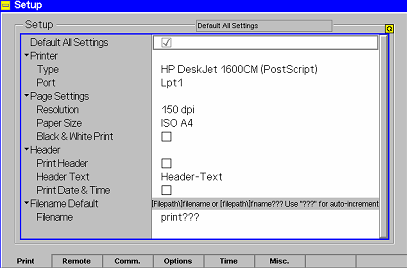
The printer type and port must be set in the Print tab of the Setup menu:
Ø To open the Setup – Print tab press the SETUP key at the front of the instrument and activate the Print hotkey at the lower edge of the screen. Ø In the Printer section set the printer type and port (COM 1 or COM 2 for the serial (RS-232) ports; LPT 1 for the parallel printer port). It is recommended to connect the output device to the parallel interface LPT, if possible: With this selection, configuration of the interface is not necessary; besides, the serial connectors may be used for GPIB bus etc.
|